Your evenings
deserve to be yours again.
TeachTimeLab generates draft feedback as a Word doc with inline comments — or a full ISMG mark proposal — in your voice, trained to your style. You read through, confirm, and download. Done.
No credit card required · 3 free senior or 6 free junior markings / month
Privacy first
What happens to student work?
Teachers are rightly cautious about student data. Here's exactly how TeachTimeLab handles it:
No documents stored on our servers — student work is processed in memory and discarded
Student names are never required — use codes only; no identifying data needed
Your data is never used to train any AI model (Anthropic's API policy prohibits it)
Built in Australia, designed specifically for Australian schools and QCAA requirements
You see and confirm every mark and comment before anything is downloaded or shared
Saved evaluation records are automatically deleted after your chosen retention window
I've been there.
Ten years in the classroom taught me one thing: it's not the teaching that drains you. It's the marking. Senior marking especially. The pressure, the volume, the sheer number of hours it quietly swallows. I built Teach Time Lab because I needed it — and I couldn't find anything that actually understood what teachers are up against.
Founder
Former science teacher · 10 years in the classroom
What Teach Time Lab does
Built specifically around the QCAA ISMG — so it speaks your language from the start.
ISMG-native from day one
Built specifically around the QCAA ISMG — so it speaks your language from the start. No generic rubric mapping needed.
Word doc with draft feedback
Generates a Word doc with draft feedback in comments — so you're adding to something, not starting from scratch.
Automatic annotation
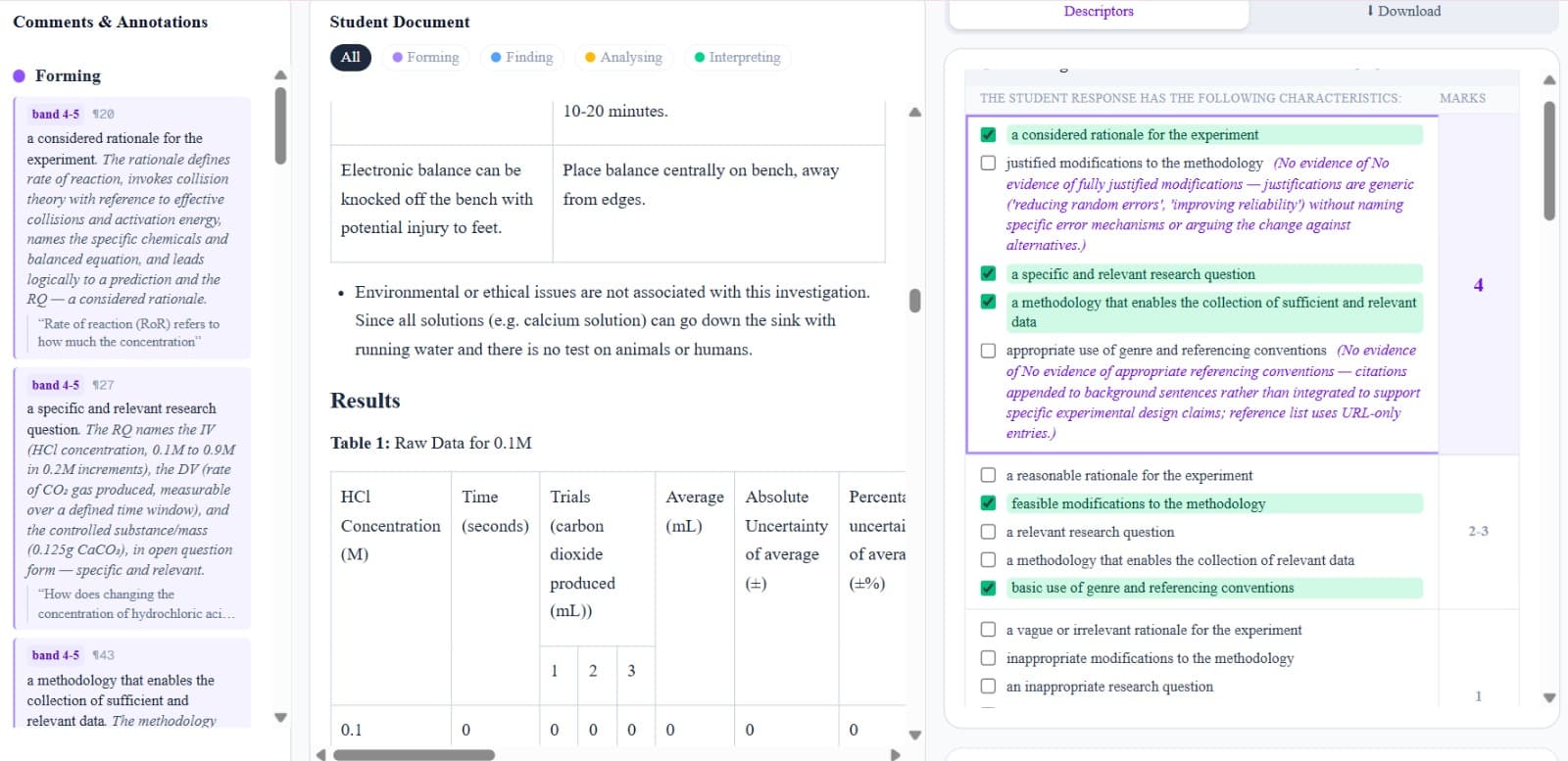
Highlights relevant sections and maps them directly to the matching ISMG descriptor, so you're not hunting through the paper yourself.
Colour-coded ISMG
Makes assignments faster and easier to read, with the evidence right where you need it — colour-coded per criterion.
Ready-to-go markbook
Exports a markbook spreadsheet — no flipping back through papers just to transfer a number. Class-ready in one click.
Class-wide patterns
Surfaces what your cohort struggled with without any extra work — so you can address the common gaps in your next lesson.
Junior Marking (Years 1–10)
Upload a task sheet, teach TTL your marking standards through calibration, then mark student work for any subject across any Australian state.
Senior Marking · Years 11–12
Two modes, one workflow
Give students formative feedback on a draft, or produce a defensible final QCAA mark. Same upload — your call per file.
Coach the draft
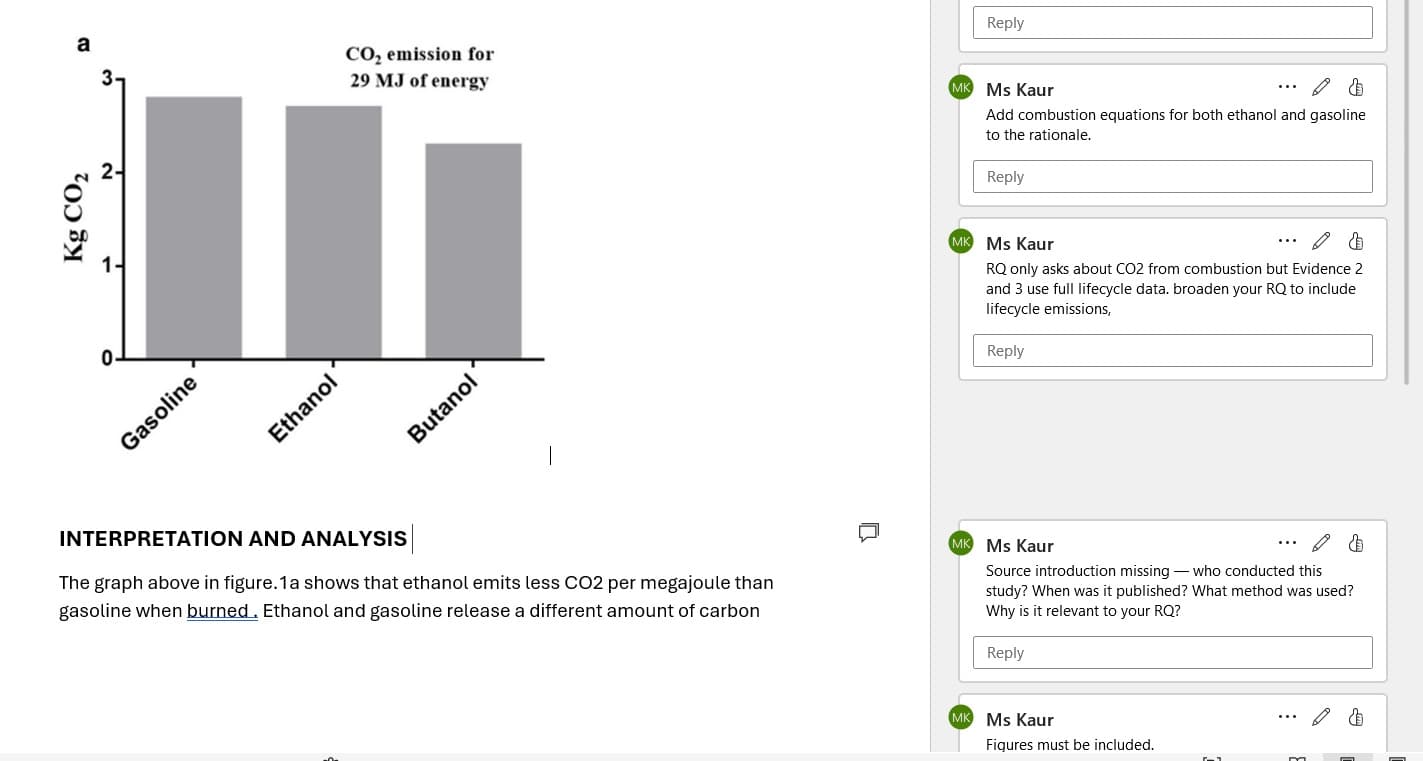
Returns the student's own .docx with Word comments inserted — specific, question-led, anchored to the exact sentence that needs work. In your voice.
Mark to the ISMG
Designed to make marking easier, not to do it for you — highlights the key elements of the student report and annotates what evidence has been found, so you mark with confidence.
Junior Marking · Years 1–10
Mark anything, Years 1 to 10
Upload the task sheet, teach TeachTimeLab your marking standards, then mark student work — for any subject, any Australian state.
Upload task
PDF or Word doc — school logos and stamps don't need removing.
Answer questions
Quick clarifying questions help TTL understand the task and rubric.
Calibrate
Mark one or two exemplar responses. TTL learns your standards.
Mark students
Upload student work one at a time, or batch up to 20 (Pro).
Review & download
Override any mark, then download the annotated feedback report.
Honest by design
What this is —
and what it isn't.
This tool will never replace your professional judgment. Every grade, every comment still comes from you.
What it removes is the grind — the repetition, the fatigue, the blank page stare before you've written a single word of feedback. You stay in control. Teach Time Lab just does the legwork.
Your Sunday night just got a whole lot shorter.
Proposes a QCAA best-fit band and mark with evidence highlighted in the student response
Writes draft Word comments identifying errors and how to fix them, in your voice
Annotates the student response so you can mark confidently against the ISMG
Surfaces class-wide patterns and exports a markbook without extra work
Replaces your professional judgement on grades
Knows your students the way you do
What teachers say
From real teachers using TeachTimeLab for senior and junior marking
Super impressed with what you've produced. I did not think I was going to be able to continue teaching senior classes with all the drafting and marking.
Janine
Senior Science Teacher, Queensland
This is so amazing. I used it to go back through my Year 12 Science marking and I'm already looking forward to using it to draft my Year 11 RI's for Biology.
Rochelle
Biology Teacher, Queensland
I can not believe something like this is possible. This is insane. I just tried draft marking in Bio, it even picked some things that I missed. This is such a big deal. Senior marking has been a big stressor for me and I finally have hope.
Melissa
Biology Teacher, Queensland
Simple, honest pricing
Start free. Top up with credits when you need them. Subscribe for the full toolkit.